Introduction
This blog discusses about educational objectives to study how to rapidly program a data scraper. Over the time, the site will change as well as the codes won’t work as is through copying as well as pasting. The aim of this blog is that you know how the web data scraper is created as well as coded so that you could make that your own.
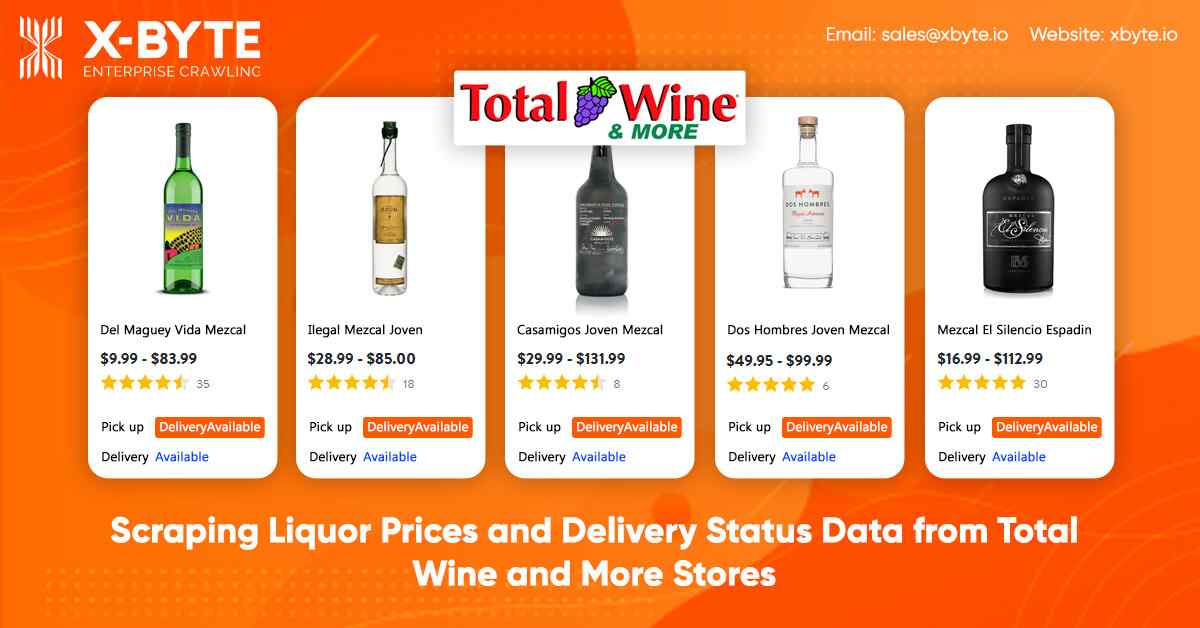
At X-Byte Enterprise Crawling, we scrape the following data fields from total wine and more stores:
- Name
- Pricing
- Size or Quantity
- InStock – If the liquor is within stock
- Delivery Available – If the liquor could be provided to you
- URL
Installing the Mandatory Packages to Run Total Wine and More Store Web Scraper
For this, we will use Python 3 as well as its libraries and this can be done in the VPS or Cloud or a Raspberry Pi. We will utilize these libraries:
- Python Requests for making requests as well as download HTML content of pages (https://docs.python-requests.org/en/latest/user/install/).
- Selectorlib for scraping data using a YAML file we have created from web pages that we download
- Install them with pip3
Pip3 installation requests selectorlib
The Python Code
To get the full code used in this blog, you can always contact us.
Let’s make a file named products.py as well as paste the Python code given into it.
 from selectorlib import Extractor
    import requests
    import csv

    e = Extractor.from_yaml_file('selectors.yml')

    def scrape(url):
        headers = {
            'authority': 'www.totalwine.com',
            'user-agent': 'Mozilla/5.0 (Windows NT 10.0; Win64; x64) AppleWebKit/537.36 (KHTML, like Gecko) Chrome/81.0.4044.122 Safari/537.36',
            'accept': 'text/html,application/xhtml+xml,application/xml;q=0.9,image/webp,image/apng,*/*;q=0.8,application/signed-exchange;v=b3;q=0.9',
            'referer': 'https://www.totalwine.com/beer/united-states/c/001304',
            'accept-language': 'en-US,en;q=0.9',
        }

        r = requests.get(url, headers=headers)
        return e.extract(r.text, base_url=url)

    with open("urls.txt",'r') as urllist, open('data.csv','w') as outfile:
        writer = csv.DictWriter(outfile, fieldnames=["Name","Price","Size","InStock","DeliveryAvailable","URL"],quoting=csv.QUOTE_ALL)
        writer.writeheader()
        for url in urllist.read().splitlines():
            data = scrape(url)
            if data:
                for r in data['Products']:
                    writer.writerow(r)
The code does the following things:
- Reads the list of More URLs and Total Wine from the file named urls.txt (The file will have the URLs for TWM product pages that you care such as Wines, Beer, Scotch etc.)
- Use the selectorlib YAML file, which recognizes data on the Total Wine pages as well as is saved in the file named selectors.yml (find more about how to generate the file will be given later in the tutorial)
- Scrape the Data
- Save the data in the CSV Spreadsheet format named data.csv
Create a YAML file named selectors.yml
Products:
    css: article.productCard__2nWxIKmi
    multiple: true
    type: Text
    children:
        Price:
            css: span.price__1JvDDp_x
            type: Text
        Name:
            css: 'h2.title__2RoYeYuO a'
            type: Text
        Size:
            css: 'h2.title__2RoYeYuO span'
            type: Text
        InStock:
            css: 'p:nth-of-type(1) span.message__IRMIwVd1'
            type: Text
        URL:
            css: 'h2.title__2RoYeYuO a'
            type: Link
        DeliveryAvailable:
            css: 'p:nth-of-type(2) span.message__IRMIwVd1'
            type: Text
Run the Total Wine as well as More Scraper
You just require to add a URL that you require to scrape the text file named urls.txt within this same folder.
In the urls.txt file, you will get”
https://www.totalwine.com/spirits/scotch/single-malt/c/000887?viewall=true&pageSize=120&aty=0,0,0,0
After that run this scraper with command:
python3 products.py
The Problems You Might Face with These Codes as well as Other Self-Service Tools or Internet Copied Scripts
- In case, a website changes the structure e.g. a CSS Selector we utilized for a Price in the selectors.yaml file named price__1JvDDp_x would most probably change over the time or every day.
- The selection of location for the “local” store might rely based on variables rather than geo-located IP address as well as the site might ask you to choose the location. It is not handled in an easy code.
- The site might add newer data points or transform the current ones.
- The site might block a User-Agent used
- The site might block the design of accessing the scripts uses
- The site might block the IP address or IPs from proxy providers
All these things and many more are the reason why full-service enterprise companies like X-Byte Enterprise Crawling work superior than self-service tools, products, as well as DIY scripts. It is the lesson one discovers after going down a self-service or DIY tool route as well as have things breaking down regularly. You may go further as well as use data to show prices as well as brands of the favorite wines.
In case, you need any help with the difficult scraping projects then contact us and we will help you!